Welcome to the new issue of AIVisCity Weekly — a weekly briefing for those who want to understand how AI tools are changing the way customers discover businesses online.
In this week’s issue:
What’s Happening in AI Search — ChatGPT Work arrives, and major brands are treating AI Visibility as a practical marketing discipline.
Weekly Insight — how small businesses can set up ChatGPT Work with existing sources to review AI Visibility, identify gaps, draft fixes, and repeat the cycle.
Try This Yourself — a small ChatGPT Work project setup you can use to run a first AI Visibility review.
Worth Reading — two deeper reads on practical AI Visibility and AEO work.
AIVisCity Answers — how should small businesses do keyword research for AI visibility?
🔍 What’s Happening in AI Search
ChatGPT Work adds a workflow layer to AI tasks
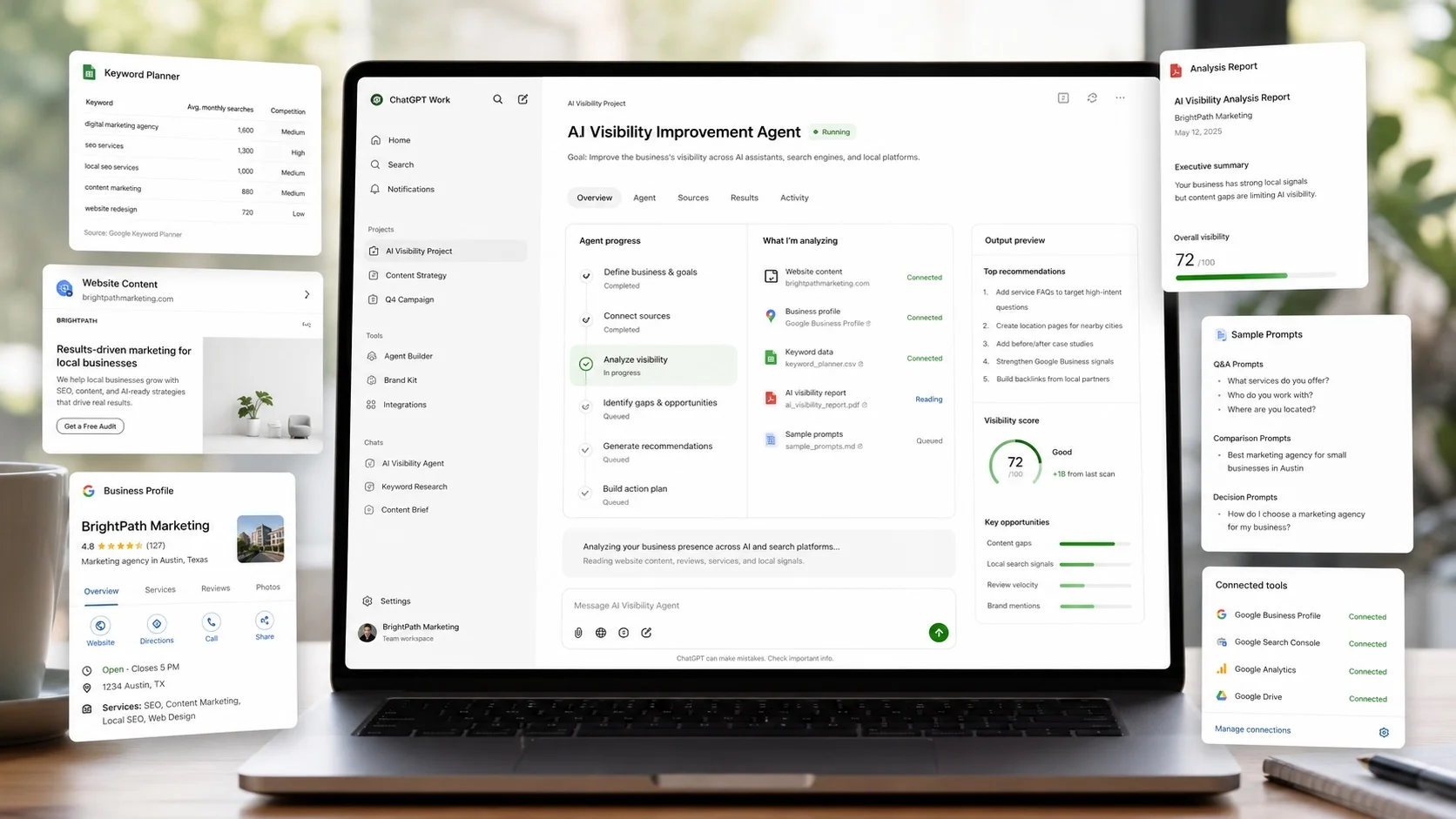
OpenAI introduced ChatGPT Work for longer tasks that can research, analyse files, work across connected apps, create documents and run scheduled tasks. This is a good fit for AI Visibility work - check out our Weekly Insight for how you can leverage it.
Source: https://help.openai.com/en/articles/20001275
Brands are moving from SEO thinking to AI Visibility work
Business Insider reports that CMOs at brands including American Eagle, Chime, Coach and Bobbie are working on how their brands appear in AI platforms such as ChatGPT and Gemini. The article highlights prompt testing, AI visibility measurement, customer research, Reddit, YouTube and more specific content built around real customer questions. You can learn from the pro here.
Source: https://www.businessinsider.com/how-coach-american-eagle-cmos-stand-out-ai-platforms-2026-7
🔮 Weekly Insight: ChatGPT Work Makes AI Visibility Easier to Review, Fix and Repeat
OpenAI has introduced ChatGPT Work for longer tasks. You can picture it as a workspace for jobs with moving parts: source material, files, decisions, drafts, reports and follow-up actions. Most importantly, instead of asking ChatGPT how to do things, you can ask it to do things.
This is a very good fit for AI Visibility tasks. Improving how AI tools understand your business usually means looking across several places at once. Moreover, it is not a one-off exercise and you will need to establish a repeated cycle, which also makes using an AI Agent a time-saver.
To help you started, below is a high-level process you can adapt according to your own needs.
Open a Work project for the review
Start in ChatGPT Work and create or open a project called “AI Visibility Review”. If you use the desktop app, you may also open a local folder for the task and grant access only to the files ChatGPT Work needs.
Add the source material
Add or connect the material Work should use: website pages, Google Business Profile wording, service documents, review exports, priority services, and a few competitor pages. Use existing files or app sources where ChatGPT Work supports them. Leave private customer records, financial documents, inboxes and sensitive internal files unconnected.
You are building a golden source to store all relevant information. Make sure you keep it updated.
Create an “Agent Brief” file
Create a short document called “AI Visibility Agent Brief”. This file should define the job: what your business wants to be recommended for, which sources are approved, what to exclude, what customer questions to test, and what output format to use.
This brief minimises repeated prompting. Future reviews can refer back to it instead of asking you to rewrite the full instruction. It also improves consistency because each run starts from the same criteria.
Run the visibility audit
Ask ChatGPT Work to use the Agent Brief and the connected sources to create a first AI Visibility report. This gives you a baseline of where you are and also what can be improved.
Turn the audit into working fixes
Once you review the audit output and decide what to fix/improve, ask ChatGPT Work to create the change, for example: a revised service paragraph, a new FAQ answer, a Google Business Profile update, review-response templates, or a checklist for your website editor.
If you use ChatGPT Work on desktop and give permission, it may also help with local draft files. If your online platforms support API or MCP access and you have some technical background, you can even ask ChatGPT Work to update the platform directly (as draft).
You still review every change before publishing - as AI can make mistakes.
Save each run as a dated report
After each review, keep the result as a dated report or spreadsheet in the project. Do not rely on memory. A visible record lets ChatGPT Work compare the current run with the previous one.
Repeat with less manual work
For the next review, update the source material and ask ChatGPT Work to rerun the audit using the Agent Brief and latest dated report. If scheduled or triggered Work is available in your account, use it to remind you or start the next check. The process is repeatable because the brief and reports are persisted as project materials.
This is just a quick introduction on how you can use ChatGPT Work to minimise the time and effort to improve your business AI Visibility. Your setup will depend on your files, apps and access. The main idea is to use ChatGPT Work to reduce duplicated effort, keep evidence connected, and improve each review-and-fix cycle.
💻 Try This Yourself
Open ChatGPT Work if you have access and create an “AI Visibility Review” project.
First connect or reference your homepage, Google Business Profile wording, one review source and one competitor site. Then create an “Agent Brief” file with one goal, such as “We want to be recommended for emergency boiler repairs in Bristol.”
Then try this prompt:
Using the Agent Brief and sources in this project, create a mini AI Visibility review with five customer-style questions, one evidence gap, and one practical fix I can make today.
Use the result to make one edit, then save the review so you can compare it next month.
📕 Worth Reading
If you're curious to look deeper into how AI search is changing the internet, these articles are worth a look.
AI visibility starts with access, structure and authority
Search Engine Land’s guide covers practical AI and LLM optimisation tactics, including crawlability, structured content, brand mentions and authority signals. For small businesses, the useful reminder is that AI visibility still starts with clear, accessible evidence.
Read: https://searchengineland.com/guide/ai-and-llm-optimization
Small businesses can start AI Visibility tracking without expensive tools
TechRadar’s small-business AEO guide explains a simple workflow: choose customer prompts, record whether AI tools mention you, compare competitors, then turn the gaps into weekly actions. It is a useful companion to this issue’s Work setup.
Read: https://www.techradar.com/pro/how-to-use-an-aeo-tool-for-your-small-business
✅ AIVisCity Answers
Q: How should small businesses do keyword research for AI visibility?
A: Keyword research for AI visibility is less about search volume and more about relevance. Focus on the real questions customers ask when they need your service, including location, problem, price, comparison, urgency, and trust-based phrases.
Want a more detailed explanation? Check out here.
👋 Until Next Week
If you find AIVisCity useful and want an easier way to keep up with practical AI Visibility updates for small businesses, you can use the button below to add AIVisCity as a Preferred Source in Google Search.
How are you seeing AI affect the way people search for businesses in your industry?
See you in the next issue of AIVisCity Weekly